

With Dashboard apps, you can integrate an app within the Super Chat dashboard for agents' use. This feature enables you to create an application independently, which can then be embedded to provide customers' information, orders, past payment history, etc.
When embedded in Super Chat's dashboard, your application will get the context of the conversation and contact as a window event. Implement a listener for the message event on your page to receive the context.
P.S. Check out our YouTube live on building a Dashboard App.
How to create a dashboard app?
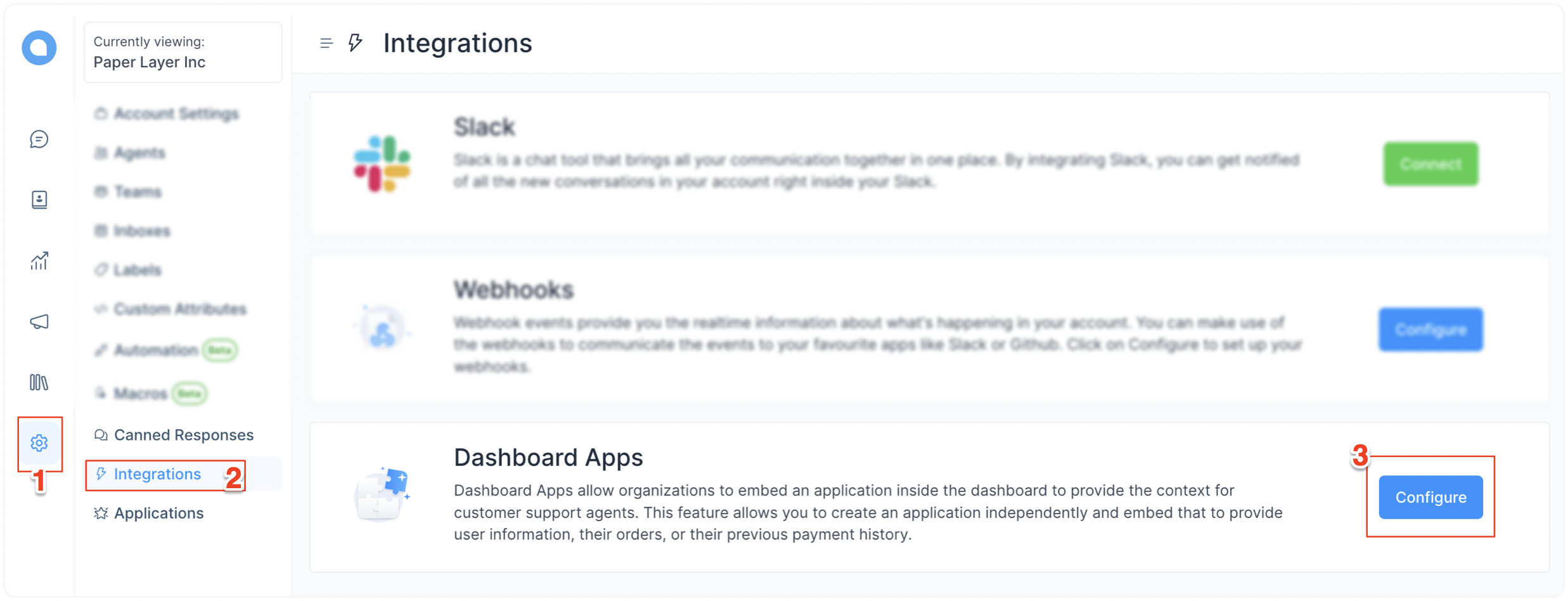
Step 1. Go to Settings → Integrations → Dashboard apps. Click on the “Configure” button corresponding to the Dashboard Apps.
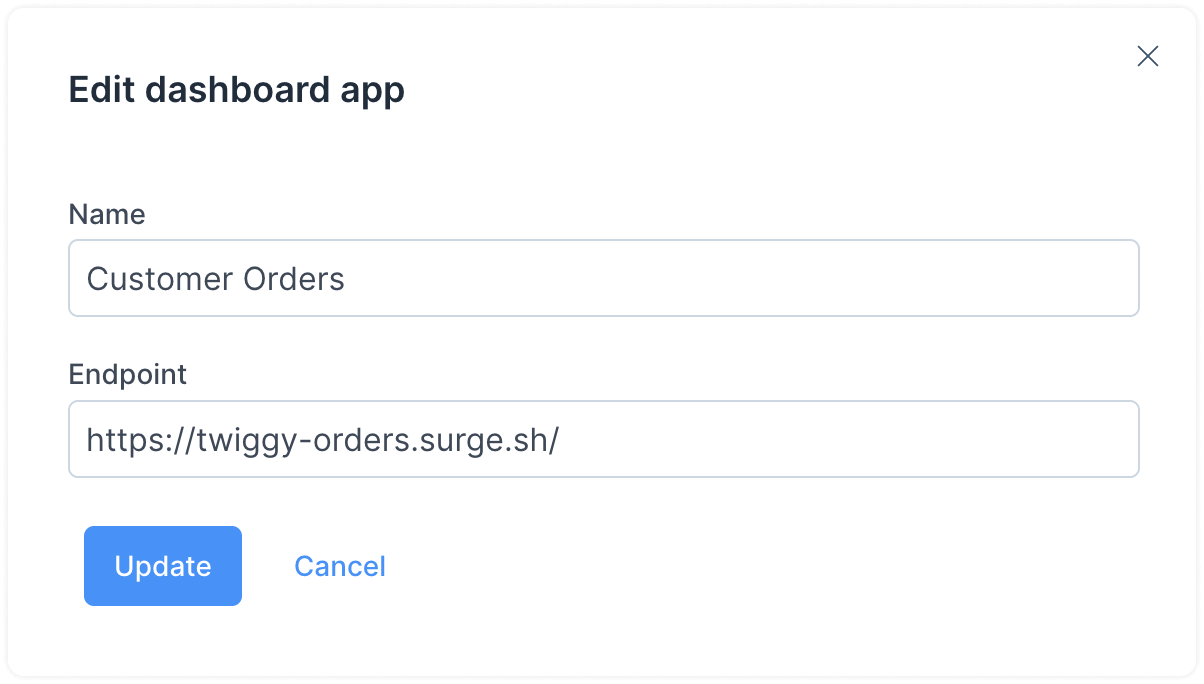
Step 2. Add your app name and the URL on which your app is hosted.
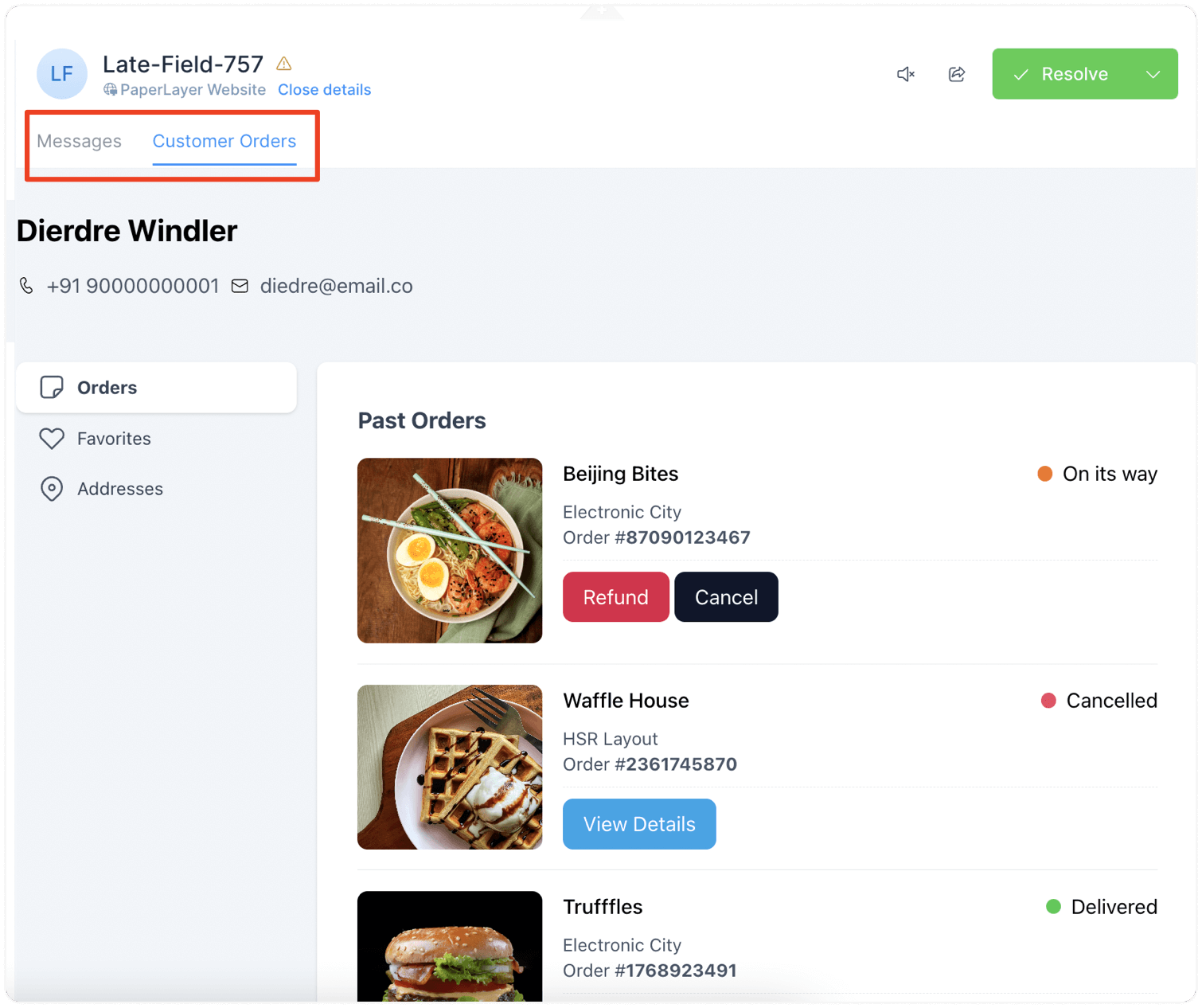
Once you are done, a new tab with the name you gave to the app will appear in the conversation window. In this case, it is “Customer Orders”.

When you click on the new tab, you will be able to see your application fetching data on the Super Chat dashboard.
Receiving data from Super Chat into your app
Super Chat will deliver the conversation and contact context as a window event. This can be accessed within your app by implementing a listener for the event, as shown here:
window.addEventListener("message", function (event) {
  if (!isJSONValid(event.data)) {
    return;
  }

  const eventData = JSON.parse(event.data);
});
On-demand request for data from Super Chat
If you need to request the conversation data on demand from Super Chat, you can send a message to the parent window using the javascript postMessage API.
Super Chat will be listening to this key: chatwoot-dashboard-app:fetch-info.
Example
The following code can be used to query the dashboard app. Super Chat will respond to this request by providing the updated conversation payload promptly.
window.parent.postMessage('chatwoot-dashboard-app:fetch-info', '*')

// You would get a message in the on message listener with the appContext payload.
Event Payload
conversation object
{
  "meta": {
    "sender": {
      "additional_attributes": {
        "description": "string",
        "company_name": "string",
        "social_profiles": {
          "github": "string",
          "twitter": "string",
          "facebook": "string",
          "linkedin": "string"
        }
      },
      "availability_status": "string",
      "email": "string",
      "id": "integer",
      "name": "string",
      "phone_number": "string",
      "identifier": "string",
      "thumbnail": "string",
      "custom_attributes": "object",
      "last_activity_at": "integer"
    },
    "channel": "string",
    "assignee": {
      "id": "integer",
      "account_id": "integer",
      "availability_status": "string",
      "auto_offline": "boolean",
      "confirmed": "boolean",
      "email": "string",
      "available_name": "string",
      "name": "string",
      "role": "string",
      "thumbnail": "string"
    },
    "hmac_verified": "boolean"
  },
  "id": "integer",
  "messages": [
    {
      "id": "integer",
      "content": "Hello",
      "inbox_id": "integer",
      "conversation_id": "integer",
      "message_type": "integer",
      "content_type": "string",
      "content_attributes": {},
      "created_at": "integer",
      "private": "boolean",
      "source_id": "string",
      "sender": {
        "additional_attributes": {
          "description": "string",
          "company_name": "string",
          "social_profiles": {
            "github": "string",
            "twitter": "string",
            "facebook": "string",
            "linkedin": "string"
          }
        },
        "custom_attributes": "object",
        "email": "string",
        "id": "integer",
        "identifier": "string",
        "name": "string",
        "phone_number": "string",
        "thumbnail": "string",
        "type": "string"
      }
    }
  ],
  "account_id": "integer",
  "additional_attributes": {
    "browser": {
      "device_name": "string",
      "browser_name": "string",
      "platform_name": "string",
      "browser_version": "string",
      "platform_version": "string"
    },
    "referer": "string",
    "initiated_at": {
      "timestamp": "string"
    }
  },
  "agent_last_seen_at": "integer",
  "assignee_last_seen_at": "integer",
  "can_reply": "boolean",
  "contact_last_seen_at": "integer",
  "custom_attributes": "object",
  "inbox_id": "integer",
  "labels": "array",
  "muted": "boolean",
  "snoozed_until": null,
  "status": "string",
  "timestamp": "integer",
  "unread_count": "integer",
  "allMessagesLoaded": "boolean",
  "dataFetched": "boolean"
}
contact object
{
  "additional_attributes": {
    "description": "string",
    "company_name": "string",
    "social_profiles": {
      "github": "string",
      "twitter": "string",
      "facebook": "string",
      "linkedin": "string"
    }
  },
  "availability_status": "string",
  "email": "string",
  "id": "integer",
  "name": "string",
  "phone_number": "+91 9000000001",
  "identifier": "string || null",
  "thumbnail": "+91 9000000001",
  "custom_attributes": {},
  "last_activity_at": "integer"
}
currentAgent object
{
  "email": "string",
  "id": "integer",
  "name": "string"
}
Final Payload
{
  "event": "appContext",
  "data": {
    "conversation": {
      // <...Conversation Attributes>
    },
    "contact": {
      // <...Contact Attributes>
    },
    "currentAgent": {
      // <...Current agent Attributes>
    }
  }
}